Expediting payroll is a feature that allows you to shorten the lead time between processing payroll and the pay date. You can use this feature if you are late processing a payroll, or if you would like to move the pay date up sooner. To expedite a payroll:
- Open the Run Payroll tab and select Recent Payrolls from the top menu.
- Locate the pending payroll that you would like to expedite and select the three action dots beside.
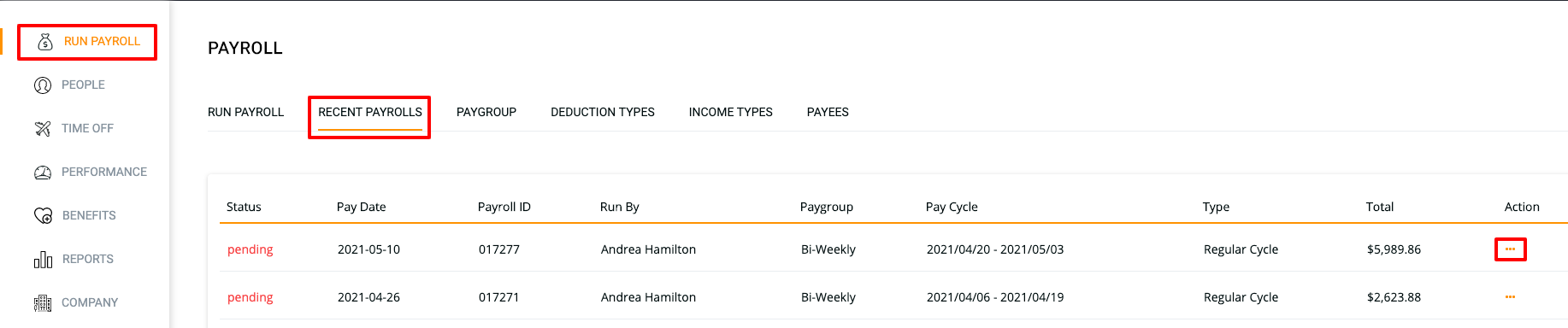
- From the drop down menu, select "Expedite Payroll...(next available date will be displayed)"
- You will see a warning message: "Are you sure you would like to expedite this payroll? An expedite fee of $25 will apply. Please make sure the numbers are correct as no edits will be allowed after expediting payroll."
- Select OK. You will see a confirmation message, and will be directed to the payroll confirmation page.
Note: a $25 charge will apply for any expedited payrolls. Click here for more information on Sundry Fees
If there is no option to expedite payroll, please email our Support Team at support@knitpeople.com, and we will review your request for expediting, subject to approval.
Kindly ensure you include the Payroll ID in your email and confirm that you agree to the $25 expedite fee. Please also attach proof of funds availability to help the team review your request.
Please note that if there has been an NSF within the last 6 months, expedite requests are typically not granted.